Run AI coding agents on your computer, from your phone.
synodic-studio/patchbay-relay· MIT
Status: alpha, no longer developed. Patchbay Relay ran my studio for months and worked well, but it was never finished. It proved the headless-first idea, and then I rebuilt that workflow on Hermes, Nous Research’s self-hosted agent framework, which covers the same routing, scheduling, and recovery with less plumbing for me to maintain. Rather than keep two overlapping systems alive I stopped developing Patchbay. I am leaving this page in the present tense because the architecture below is still the clearest explanation of how phone-only development actually works.
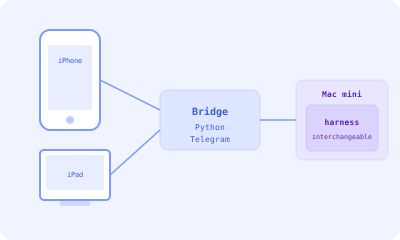
I run my software studio with only a phone, a tablet, and a Mac Mini. The Mac Mini handles builds, tests, and deployments from another room of the house, and every interaction I have with it goes through Telegram on the phone or the tablet.
That isn’t a limitation I’m working around, it’s a design choice I made on purpose. The rule that everything has to work from a phone via Telegram has shaped every tool, automation, and agent in my workflow. Patchbay Relay is the piece of plumbing that makes the whole thing tick: a bridge that routes Telegram messages to AI coding agents (Claude Agent SDK, Claude Agent SDK with MOP filtering on top, pi) through a pluggable harness layer, with multi-project routing, agent identity loading, and crash recovery built in.
This page walks through how Patchbay Relay works, why I picked Telegram specifically, and what “headless-first” development actually looks like day to day.
The Constraint: No GUI, No Browser, No Terminal
If a development task requires opening a browser, launching an IDE, or accessing a terminal directly, that’s a design flaw I want to fix. Once you start operating from a phone the reasoning is obvious:
- You cannot have multiple windows open simultaneously
- Copy-paste is unreliable across apps
- Terminal emulators on mobile are painful
- Browser-based dashboards require constant context switching
- You cannot run local development servers
The solution is not to make mobile development easier. The solution is to make a system where the human’s only job is to give instructions and review results. Everything else is automated.
Why Telegram
I evaluated several chat platforms before settling on Telegram:
- Telegram Bot API is well-documented, free, and does not require a business account
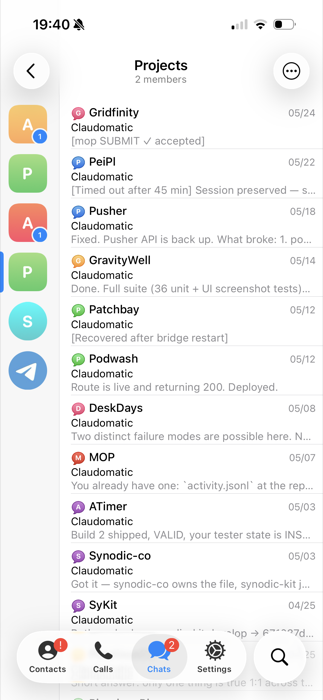
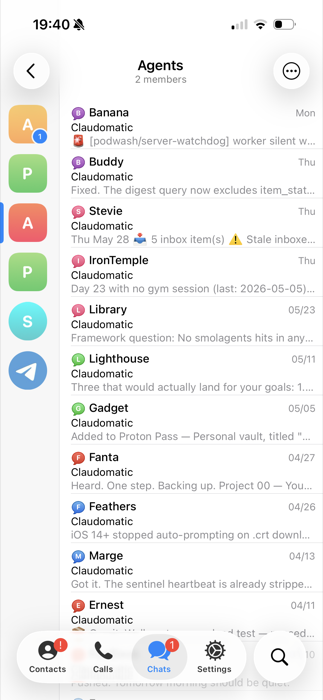
- Topics (threaded sub-conversations within a group) provide natural project and agent isolation
- No message size limit (practically) for bot responses, though I enforce my own limits
- Markdown support in messages, though the flavor is limited
- File sharing works natively for screenshots, crash logs, and audio messages
One accidental bonus showed up at 35,000 feet. United’s free in-flight messaging allowlist includes Telegram’s servers, and since the entire studio is driven over Telegram, that means I can run Claude Code from seat 14C without buying WiFi. I did not build a Telegram bridge to dodge eight dollars of in-flight internet, but it is a genuinely fun side effect that the whole thing rides the one channel airlines leave open for free.
Patchbay Relay Architecture
Patchbay Relay is a Python application that bridges Telegram to a pluggable AI coding agent backend:
Telegram Bot API (long-polling)
  -> bridge.py (message router)
    -> chat_projects.json (topic -> directory mapping)
    -> harness backend (per-session)
       cc-sdk / cc-sdk-mop / pi
      -> synodic-kit plugin (hooks, skills, commands)
      -> agent identity stack (if topic maps to an agent)
    -> response chunking + typing indicators
  -> Telegram Bot API (send response)
The bridge maintains one agent session per active topic. Messages arrive, get routed to the correct session based on the topic ID, and responses stream back with typing indicators so the conversation feels natural.
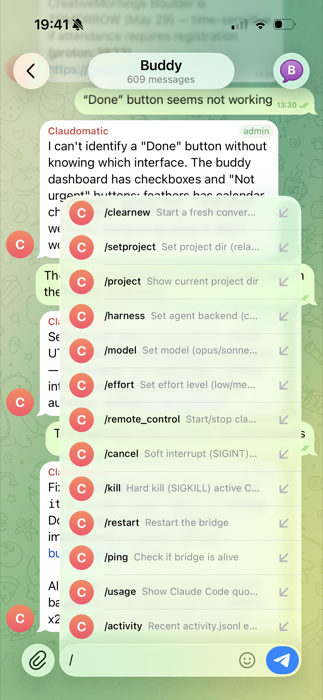
The harness layer is the seam that makes Patchbay Relay harness-agnostic. Each backend implements the same Harness protocol — a streaming-event interface with declared capabilities like resume, mid-turn push, tool streaming, and MCP support. The bridge does not bake Claude-only assumptions in; it picks a harness per topic via /harness <name> and degrades gracefully where a backend lacks a capability. The current backends are cc-sdk (Claude Agent SDK), cc-sdk-mop (the SDK with MOP wired in for voice and behavior filtering), and pi (badlogicgames/pi).
That mid-turn push, feeding a new message into a live turn at the next natural break instead of queuing it, is the same shape as Claude Code’s Channels feature, and Patchbay started leaning on it through the cc-sdk harnesses.
Session Management and Crash Recovery
The bridge runs as a launchd service with KeepAlive: { SuccessfulExit: false }, so if it crashes, launchd restarts it immediately.
Crash recovery works through a pending message directory:
- When a message arrives, it is written to
pending/<message_id>.jsonbefore processing - The message is routed to the active harness backend
- When the response completes, the pending file is deleted
- On restart,
replay_pending()finds any surviving pending files and resends them with a[Recovered after bridge restart]prefix
The pending file is deleted before processing begins (not after) so that a crash during processing does not create an infinite retry loop. The worst case is a dropped message, not a crash loop.
Multi-Project Routing
chat_projects.json maps each Telegram topic to a project directory and optionally an agent identity:
{
  "-100123456789_4": {
    "path": "personal-site",
    "agent": "writer"
  },
  "-100123456789_202": {
    "path": "personal-site",
    "agent": "researcher"
  },
  "-100987654321_6": {
    "path": "side-project"
  }
}
(Chat IDs are anonymized. Yours will look similar: Telegram supergroup IDs are negative integers, with topic IDs appended after an underscore for forum-mode groups.)
When a topic maps to an agent, the bridge passes --append-system-prompt with instructions to load that agent’s identity stack files. This means sending a message in the Researcher topic gives you a Claude session that has already loaded the Researcher’s personality, memory, and operating manual.
Topics without an agent mapping get a plain Claude Code session pointed at the project directory. This is how I do normal development: I send a message in the project’s topic, and Claude has access to the full codebase with synodic-kit’s plugins active.
Tappable Links to Native Apps
Telegram does not render custom URL schemes as clickable, so an obsidian:// link arrives as dead text. The agents I run need to hand me one-tap links into Obsidian notes, reminders, and calendar dates all day long, so a small companion Worker wraps each custom scheme in a plain https:// URL that the chat app will render and a browser hop turns back into the native scheme.
It lives in its own repo and has its own writeup: Tappable Links covers the routes, the deploy, and the optional secret-paste form.
Pinning Python to Avoid TCC Outages
macOS Transparency, Consent, and Control (TCC) permissions are binary-path-specific. When Homebrew upgrades Python from 3.12.3 to 3.12.4, the binary path changes, and every TCC permission (Full Disk Access, Calendar, Contacts) is silently revoked.
This is catastrophic for a headless system. The Telegram bridge stops working because it no longer has permission to access the filesystem. Calendar event creation fails silently. The system looks healthy from the outside but is completely broken.
The fix is not to detect the failure after Homebrew has already upgraded the binary; it is to never let the upgrade happen unplanned. Python is pinned to a specific TCC-approved version on the Mac Mini and held there. An infrastructure monitoring agent watches upstream Python releases and scans each changelog for things worth upgrading for, like security fixes or language features I actually use. Releases that don’t warrant the cost go on an ignore list and never trigger another alert. Releases that do warrant it surface as a planned-upgrade recommendation with the specific changelog item that prompted it.
When a planned upgrade is approved, it is a deliberate operation. I screen-share into the Mac Mini from my iPad, run the upgrade, re-grant the TCC permissions in System Settings, and validate that the bridge is back. The system is never silently broken because it never silently changes underneath itself.
Lessons Learned
Message length discipline matters. The single most impactful UX improvement was enforcing short Telegram messages. If a response exceeds roughly 200 words, it goes into an Obsidian note with a link back to the message. Reading a wall of text on a phone is a terrible experience, and a two-sentence summary with a link is perfect.
Crash recovery is not optional. The bridge will crash, the agent harness will sometimes hang, and the Mac Mini will kernel-panic during a macOS update. Every one of these scenarios has happened, and the pending-message recovery system has saved dozens of interactions from being silently lost along the way.
Topic isolation is powerful. Having one Telegram topic per project (or per agent) means context never bleeds between conversations. I can talk to my birding agent about a recent sighting and to my repo-strategy agent about a stuck pull request in adjacent topics without either session seeing the other’s context, and that turns out to be significantly better than a single chat window.
Voice-to-text matters more than I expected. I dictate most of my Telegram messages with Wispr Flow, but iOS dictation or Telegram’s built-in voice keyboard work fine too; any power user can pick the tool they like. Dictated instructions tend to be more conversational and less precise, and the agent identity stacks pick up the slack on what voice leaves out.
Physical access is mostly optional. Ssh, mosh, and screen sharing from the iPad cover almost every operation that used to need keyboard time on the Mac Mini. Hardware issues and kernel-panic recovery are the only real exceptions.