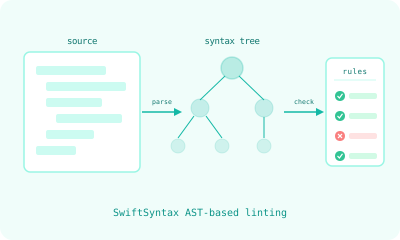
Twelve custom Swift lint rules built on SwiftSyntax AST analysis, plus three smart CLI wrappers that find their config automatically.
synodic-studio/swift-quality-tools· MIT
Standard linters match text patterns. The rules in this package analyze the abstract syntax tree. When a rule says “body must have exactly one top-level view,” it needs to understand Swift’s syntax: what counts as a top-level view, what counts as a modifier chain, what counts as a conditional. SwiftSyntax gives each rule access to the actual parsed structure of the code, so the rules can express architectural constraints that text-pattern linters cannot.
The package contains 12 custom rules, 3 smart CLI tools, a directive suppression system, parallel file processing, and Xcode build phase integration. 86 tests cover rule triggers, non-triggers, edge cases, and fix-it suggestions.
The Rules
The twelve rules group into four areas. Each enforces something a text-pattern linter cannot see.
View body
skimmable_body— a SwiftUIbodymay not exceed 15 lines, which forces extraction once it grows complex.one_top_level_view— a body must have exactly one top-level view, so the implicit result builder stays predictable.no_group_body— no bareGroupas a container unless it actually carries modifiers.no_if_modifier— bans the.if(condition) { ... }modifier, which breaks SwiftUI’s structural identity and its diffing.no_if_without_else— flagsifwithoutelsein a@ViewBuilder, where a view should not be deciding its own visibility.
Code quality
excessive_nesting— caps indentation depth at 3, measured from the AST so it survives reformatting and relaxes inside#Preview.prefer_shorthand_optional_binding—if let foo = fooshould be the shorthandif let foo.
View structure
stack_minimum_children— aVStack/HStack/ZStackshould hold at least two children; a single child wants no stack.single_modifier_per_line— one SwiftUI modifier per line.
Framework
prefer_swift_testing— flags XCTest in favor of Swift Testing, with migration hints (XCTAssertEqualbecomes#expect(a == b)).no_exported_import— bans@_exported import, an unstable underscore-prefixed Swift API.prefer_zero_param_onchange— use the zero-parameter.onChange(of:)form when the old value is ignored.
Architecture
Parallel AST Processing
Files are processed concurrently via Swift’s TaskGroup:
Source files discovered
    ↓ filter by .swift extension
    ↓ exclude paths from .swiftlint.yml
    ↓ TaskGroup: one task per file
Each file → SwiftParser → SyntaxTree → 12 Visitors → Violations
    ↓ aggregate
Sorted violation report
Smart Config Discovery
Three CLI tools (swiftformat-smart, swiftlint-smart, swiftlintcustom-smart) find configuration automatically:
- Check for an explicit
--configparameter. - Search the current directory (error if multiple configs found).
- Walk up the directory tree to root.
- Fall back to a shared config at
~/Developer/swift-quality-tools/Configs/.
Works from any directory in any project. No path configuration needed.
Directive Suppression
Full SwiftLint-compatible suppression syntax with the swiftlintcustom: prefix:
// swiftlintcustom:disable:next skimmable_body
var body: some View { /* allowed to exceed 15 lines */ }

// swiftlintcustom:disable excessive_nesting
// ... block region ...
// swiftlintcustom:enable excessive_nesting
Xcode Integration
Two-stage parsing works around Xcode’s build phase sandbox, which suppresses subprocess output. The tool detects the XCODE_VERSION_ACTUAL environment variable and adjusts output format. A shell wrapper re-echoes violations in Xcode’s expected format so they appear as inline warnings in the editor.
What to Take From This
If you are building Swift quality tooling for a codebase larger than yourself, two patterns from this package are worth lifting:
Push opinionated rules into AST analysis. Anything you can express as “the structure of this code is wrong, regardless of formatting” should live as a SwiftSyntax visitor. Anything you can express as “this character pattern is wrong” can stay in SwiftLint. The split is real and the AST side is much smaller than you think.
Make the CLI find its own config. Tools that require explicit --config flags get used wrong. Tools that walk up the directory tree to find their config get used right.
The full source is on GitHub at synodic-studio/swift-quality-tools, MIT-licensed.