My personal Claude Code plugin: skills, hooks, and the conventions that hold a phone-only workflow together.
synodic-studio/synodic-kit· MIT
I run my software studio with only a phone, a tablet, and a Mac Mini. Every interaction with the Mac Mini happens through Telegram, and the agent on the other end of that pipe is Claude Code. synodic-kit is the plugin I have built up over time to make that work the way I want it to.
This page walks through what is actually in the plugin today, why each piece exists, and what you might want to steal for your own setup. The repo is opinionated to a specific machine, vault, and workflow, so this is more interesting as a pattern catalog than as a turnkey install.
The Shape of the Plugin
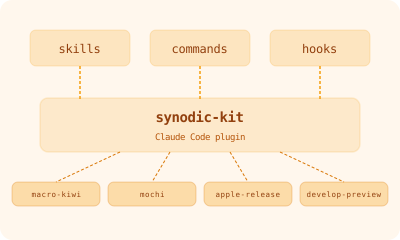
A Claude Code plugin can contribute four kinds of things to a session: skills, commands, hooks, and MCP servers. synodic-kit leans on the first three and no longer ships the fourth.
synodic-kit/
  .claude-plugin/
    plugin.json
    marketplace.json
  skills/                  15 skills, on-demand domain knowledge
  hooks/                   8 Python lifecycle hooks
  commands/                1 command (/open)
That split is on purpose. A skill loads itself when its description matches the task; a slash command only runs if I remember to type it. Since I am almost never sitting at a terminal, anything that depends on me remembering to invoke it is effectively dead, so nearly every workflow here is a skill.
Skills: domain knowledge on demand
The 15 skills cluster into three groups. Each is loaded only when its description matches what I am doing.
Apple platform work
apple-platform-dev— MVVM-plus-Manager patterns, Metal and Core Data integration, concurrency.swift-quality— my SwiftUI body-length and view-structure rules.apple-release— fastlane and notarization, including the specific bugs and Ruby version cliffs I have hit.testflight-ship— a checklist for uploading a build and inviting a tester without leaving the build orphaned.debug-builds— separates Debug from Release with bundle ID suffixes and overlay icons.
Cobalt vault (my personal Obsidian vault)
cobalt-sync— the headlessobdaemon I switched to in April 2026, and the booby trap of the Obsidian GUI app on a headless Mac Mini.cobalt-replies— how agents process my reply blocks inside vault docs.cobalt-links— generates thego.kj6.dev/obs/URLs I use to share vault notes from Telegram, sinceobsidian://does not open from a phone.
General tooling
pocketbase— my self-hosted backend atdb.synodic.co.openscad— the scripted, parametric language I use to model printable parts.beads-init— initializes Beads AI-native issue tracking.develop-preview— ships a Hugo preview build to my Vultr box behind Tailscale.mochi— captures facts as Mochi spaced-repetition flashcards through a CLI, so the agent can make a card the moment something is worth remembering.macro-kiwi— a single CLI for the gen-AI Claude does not ship with: image generation, editing, vision, and an OpenAI escape hatch.self-healing-errors— the pattern I use for any code Claude maintains: errors must carry enough information for the LLM to fix the problem on the next pass.
Hooks: the guardrails I kept
Hooks are Python scripts that fire at fixed points in a Claude Code session. synodic-kit has eight. I run Claude Code with permissions skipped, so these hooks, not permission prompts, are what sits between the agent and a bad day.
The largest is pre_tool_use.py. It inspects every tool call and steps in on a deliberately short list of things I never want to happen:
- Force-pushes to any branch.
pipandpython -m venv, which it redirects touv.findorgrep -rrooted at$HOMEon macOS, which triggers a TCC permission cascade that locks the machine up for the better part of an hour.- Bare
swiftlint/swiftformat, which it pushes to the-smartwrappers that load the right config.
That list used to be longer. Earlier versions also blocked direct commits to protected branches like main and production, refused --no-verify and other test- or signing-bypass flags, and parsed compound shell commands so a cmd1 && cmd2 could not smuggle a destructive operation past the agent. That was the right instinct when I was reviewing every change by hand. As I moved away from moment-to-moment coding I pulled most of those back out and now run closer to the metal, keeping only the handful above that guard against genuine foot-guns rather than judgment calls.
The other seven hooks handle session lifecycle rather than safety. session_start.py reports working-tree state, post_tool_use.py runs language-appropriate formatters on edited files, pre_compact.py snapshots context that should survive a compaction, stop.py and subagent_stop.py fire end-of-session notifications, session_end.py cleans up, and user_prompt_submit.py injects cross-cutting reminders in front of the model on every prompt.
One command, on purpose
There is exactly one command in synodic-kit: /open, which opens the most recently relevant file from the current conversation. It is handy, though I reach for it far less now that I have backed away from moment-to-moment, hands-on coding. Everything else that might have been a command is a skill instead, so the model can load it from context rather than wait for me to remember it.
This is a position, not an accident. Slash commands assume the human knows in advance which workflow to invoke. Skills let the model figure that out from context, which fits how I actually work.
What to Take From This
If you are building your own Claude Code plugin or thinking about how to package your conventions, three things from synodic-kit are worth lifting wholesale.
Prefer skills over commands. Skills compose with the model’s planning. Commands fight it. Anything you can describe as “use this when X happens” should be a skill.
Put your safety in hooks, not prompts. A rule in a hook runs deterministically. A rule in a prompt runs sometimes. If a rule matters, it belongs in pre_tool_use.py.
Publish your plugin even if it is opinionated. A plugin tied to your specific machine and workflow is still useful as a reference. People learn faster from real working code than from sanitized examples.
The full source is on GitHub at synodic-studio/synodic-kit, MIT-licensed.